
This article describes the enhancements and changes to Mondial CRx which have been included in the 05-31-2022 release (deployed to customers on 06-07-2022).
List of Key Enhancements/Changes
Enterprise Setup
User Profiles and Security
- A role-based user profile and security model has been implemented:
- Users can now be associated with pre-defined 'Roles' which are allocated application features.
- Users can also be associated with companies. As a consequence, a user will only be allowed access to data based on the companies that they have been associated with.
- Note: To avoid sudden loss of data visibility, users already established in existing Mondial customers applications will be defaulted to a role with all features available ("Group Application Administrator") and access to all companies in their portfolio.
- For a more detailed understanding of how this new feature can be implemented, please refer to this article. Please also reach out to our customer services team if you require implementation assistance.
- Previously, a user needed access to the User-Management view in order to change or update their passwords. In line with the implementation of Role-Based Authorization, new functionality has been added to the Users page to allow the signed-in user to update or change their passwords. The process of updating passwords has been explained in this article.
- Once a user is signed in to Mondial, their user login is now displayed on all pages at the top right-hand side of the page.
Accounting Adjustments
-
To simplify the Translation (CTA) process in Accounting adjustments, the existing FX Types have been modified to the following:
FX Type
Translation Method
Translation calculation
Average
Average Rate
(Current Period End rate + Prior Period End rate) /2
Period End
Period End Rate
Current Period End rate
Historical
Historical
Historical rate
Excluded
None
No calculation
Budgets:
A new user interface has been added to allow users to import budget data into a Mondial application.
- A user can now create a budget and associate versions (iterations) within that budget.
- Once created, data for this budget can be imported via a CSV (Excel) file.
- Data can be subsequently exported, modified in excel and, via the import function:
- the current version is replaced
- imported to a new version within the current budget
- imported to a new budget and version.
For details on how to use this new functionality, please refer to this article.
Report Writer:
Column Layouts
- An additional selection option has been included to enable the display of a dash (-) on reports where the column/row intersection returns a zero value. To enable this feature, check the Zero to Dash box on column details.
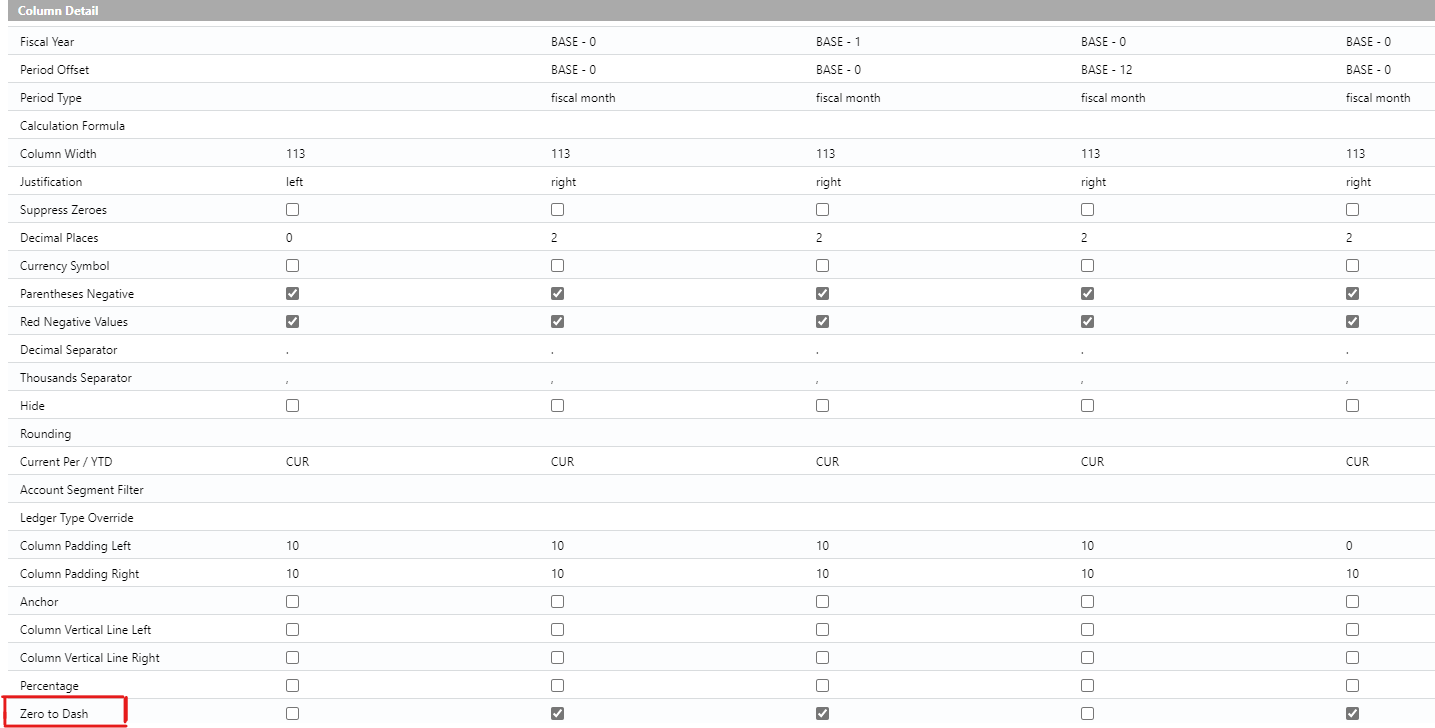
- When copying a column, the last part of a column layout configuration did not get copied into the new column. This has been fixed.
Report Writer Row Formats
- Previously, the delete option on the Edit Row Format screen did not present a warning before deleting a row. To prevent accidental deletion, a dialogue box has now been added which seeks confirmation before deletion is performed.
Report Writer output
- In line with the new budget functionality described above, when running a report which includes budget data as part of the report specification, the budget selection field now requests both the budget and the version number.
- Improvements have been made to the output to Excel feature to more closely resemble the output to screen and output to PDF:
- column headers and footers are now included
- formatting, where possible, is also replicated.
- Improvements have been made to the naming convention used when downloading Row Formats as CSV. The downloaded CSV file now bears the name the Row Format associated with it.
Comments
0 comments
Please sign in to leave a comment.