
This article describes the enhancements and changes to Mondial CRx which have been included in the 31-03-2022 release.
List of Key Enhancements/Changes
Report Writer Enhancements
Column Layouts
- Dimension filters: This major new feature has been added principally to address the specific requirements of customers where SAP B1 is the source ERP. The design of this feature however, is such that it could prove advantageous in non SAP B1 settings. Filters can now be set to limit data by dimension. For example if a dimension established in SAP B1 is set as Region (e.g. North, South. East, West), each region can be declared and data filtered into separate columns in a Mondial report.
- New selections have been added improve the formatting and display of reports rendered to PDF:
- A specific column layout can now be set as the anchor point for a report. Setting a column as the anchor effectively 'centers' the selected column within the body of the report from a (PDF) display perspective, with all other columns being 'anchored' around it.
- Additional selections have been added for column "padding", providing (in addition to column width), a further more subtle mechanism to control the display of each column in a report.
- A new formatting option has been added to allow for a column to display the percentage sign against each row of data for the column(s) in question.
Format Codes
- All ‘Action” buttons have been moved to the left-hand side of the screen in order to improve 'look and feel' consistency with other areas of the application.
- The application of font colors has has been made more consistent across report writer and templated reports.
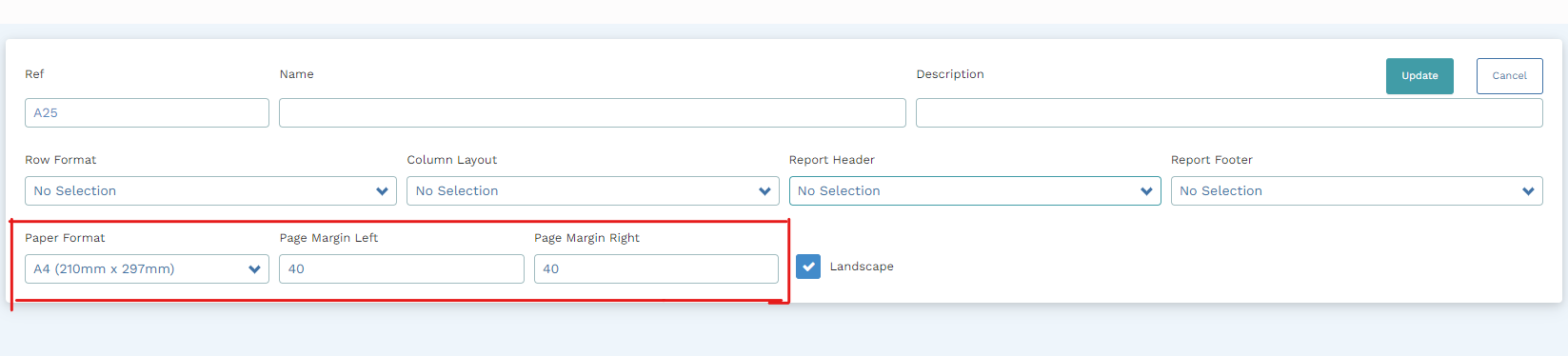
Reports Page Format
General formats for a report have been added to the report specification page.
- You can now select a preferred Page Size format on the report setup screen.
- You can customize the Page Margins to the left and the right of a report.
- The landscape setting has been moved from column layouts to the reports specification page.
 Report Drilldown
To support the addition of dimension filters in column layouts (see note above) the report drilldown feature has been enhanced to support this multidimensional tagging feature.
Templated Reports Enhancements
- On the Progressive Trial Balance report, the "Source System" transactions will always be shown in the first column of the report, so the run time checkbox for those transactions is really not functional. The option to enable or disable source system entries has been therefore been disabled.
- Updates have been made to the Custom GL account range option when running a templated report to allow more precise filtering and selection.
- The performance of the “Download CSV’ function has been optimized.
- The drill down function (from reports) has been improved to ensure that numeric values are right justified.
Enterprise Setup Changes
New Menu Options
Data Audit and Job Statuses have been added within Enterprise Setup.
- Under Data Audit, any changes made to report writer specifications (column layouts, row formats etc.) can be fully traced and identified. Users will be able to check what changes were made to report specifications, when they were made and by whom.
- The Job Status option will be fully activated in a subsequent release.

You can find the documentation for Data Audits here and for Job Statuses here.
Language Enhancements
As part of of our internationalization roll out, the application can now be fully presented to the user in Spanish. Changes have been made to the User Settings Options to include Spanish - Simplified as a language option for users. Further languages will be added in subsequent releases.
Ledgers
When a new Group/Company is created, the associated Default Ledger is automatically mapped to all the system transactions.
Chart of accounts CSV download/upload.
Improvements have been made to the chart of account download and upload processes such so the user can control upload and download by ledger.
Miscellaneous
Initially (but not exclusively) developed for users of SAP B1, a new transaction type has been created to identify that a transaction is specifically related to end of year processing (in the source system). Users can then decide if these transactions should be included in report writer reports or not.
Bug Fixes
- A bug affecting the calculation of Fiscal Year Offsets in report Writer Column layouts has been fixed.
- Report rows were evaluated to non-zero amounts when a reporting set without a Chart of Accounts mapping was selected. This has been fixed.
- In certain scenarios, the Detailed Trial balance report was not calculating totals correctly. This has been fixed.
- An issue running the Trial Balance templated report for those companies with a single chart of account segment has been fixed.
Comments
0 comments
Please sign in to leave a comment.